Learn how to use DeX, end to end
This guide walks you through the DeX workspace — how to create your organization account, how the eight-stage SDLC pipeline works, how to create your first project, and how DeX AI helps you at every step along the way.
DeX Workspace
From a raw business request to a shipped, deployed feature — see the full DeX pipeline run end to end.
A full walkthrough of the DeX workspace, start to finish.
The problem, the pipeline, the first project
What DeX removes from your workflow, how the pipeline removes it automatically, and exactly how to start your own project today.
Specs and code drift apart
Most teams lose days translating a business request into requirements, then more translating requirements into tickets — and the two fall out of sync the moment the build starts.
- Knowledge scatters across chats, docs, and disconnected AI tools, so teams re-explain the same project over and over
- Manual BRD/SRD/FSD writing stalls development before it begins
- Specs, build, and QA drift apart once a project is underway
- Moving sensitive project data across many separate AI tools raises governance and compliance risk
One pipeline, kept in sync
DeX turns a business request straight into governed documentation, then keeps every later stage — plan, build, code, QA, deploy — linked back to that same source, inside one secure platform.
- Your brief compiles into BRD, SRD, and FSD automatically
- Specs stay linked to the tasks, build, and code that implement them
- Every stage is versioned, testable, and visible in one dashboard
- One governed environment replaces scattered tools, with AI and human approvals working together
One pipeline, eight stages
Every request flows through the same agentic pipeline, from raw business intent to a completed, deployed feature. See the full walkthrough in Active Projects.
Original project inputs and intent are captured before anything else happens, so every later document traces back to a real ask.
DeX compiles the business, software and functional specs from your project brief — your first generated artifacts.
Specs are broken down into a development plan and discrete, trackable tasks ready to be worked on.
Tasks move into compilation and build, turning planned work into a runnable artifact.
Every change is committed to a repository, so the build stays versioned and reviewable.
Automated and manual testing validate the build against the original spec before it goes further.
A validated build is shipped out, with a live preview so you can confirm it before it goes fully live.
Finished work lands in history, giving you a full, searchable record of everything that shipped.
How to create a project
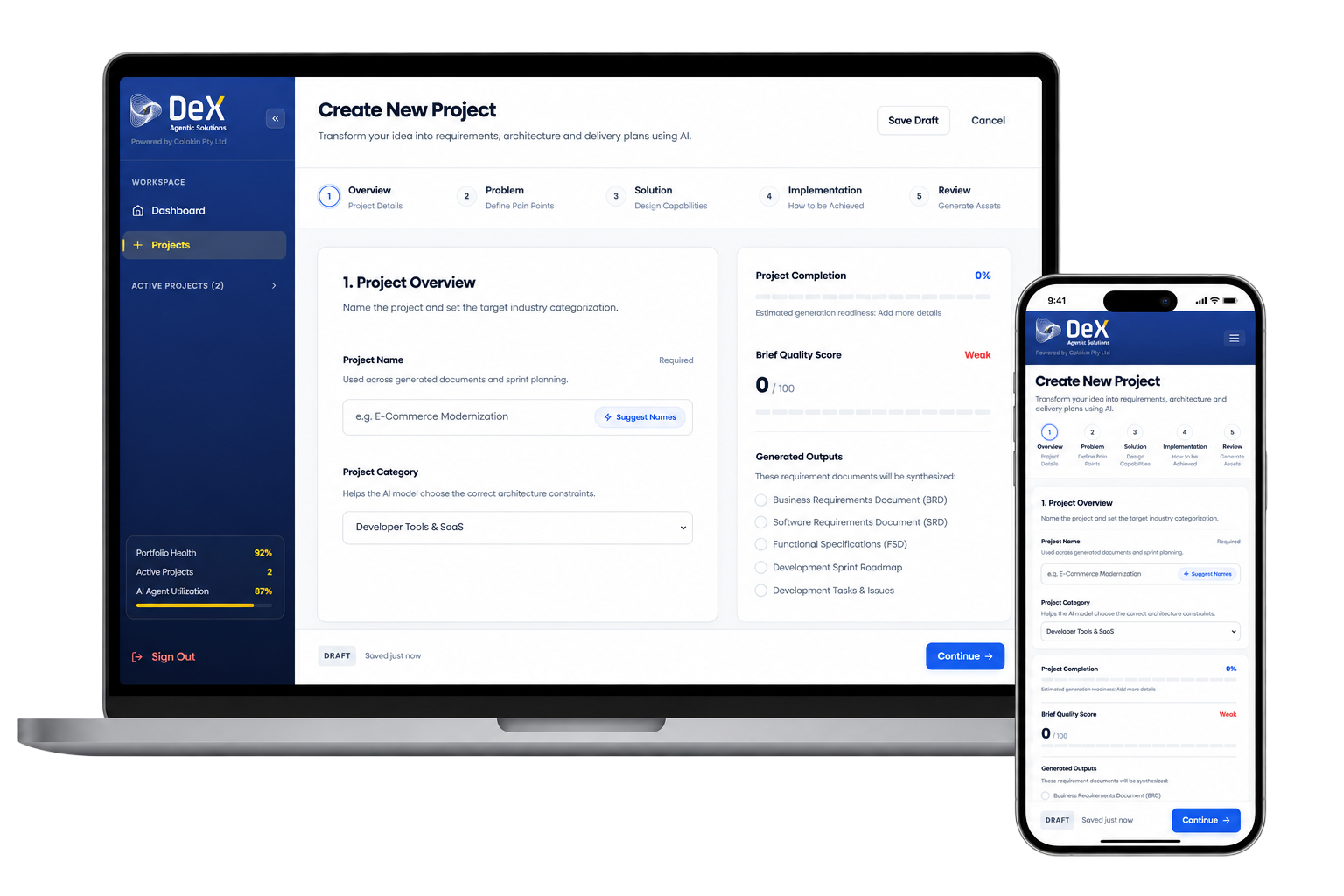
Every project passes through the same five-step brief. The more specific your inputs, the higher the quality of the documents DeX generates for you.
🏷️Project Overview
Name the project and set its category — this guides the AI in applying the right architecture constraints later on.
- Project Name (used across all generated documents)
- Suggest Names (AI-assisted naming)
- Project Category, e.g. Developer Tools & SaaS
🎯Problem Definition
Capture the real-world pain points your project addresses — what is broken, who is impacted, and which metrics are failing.
"Traditional MSME and CMA loan processing is slowed by manual paperwork, fragmented systems, and compliance delays."
🧩Solution Design
Describe what you’re building, who it’s for, and how success will be measured, across five tabs.
- Overview — core value proposition
- Target Users — primary & secondary groups
- Key Features — essential capabilities
- Workflows — key process flows
- Success Metrics — measurable outcomes
🏗️Implementation
Specify the technology choices that shape your architecture and infrastructure, across three tabs.
- Frontend Stack — frameworks, styling, state
- Backend & DB — language, framework, schema
- Infra & Security — cloud, CI/CD, auth, compliance
✅Review
Confirm every input is accurate, then trigger the AI Document Compilation Engine to generate your BRD, SRD, and FSD.
- Verify name, category & problem statement
- Confirm solution & implementation details
- Click Generate Documentation to launch the AI engine
Already running in production, across industries
DeX isn't a concept — organizations in some of the most regulated and complex sectors already use it to run their software delivery lifecycle end to end.
- Healthcare
- Banking
- Education
- Logistics
- Manufacturing
- Government
- Enterprise Technology
Create Your Account
Create your account, set up your organization, and get oriented in the Dashboard.
View page →Projects Overview
The five-step guided brief every project passes through, from name to generated docs.
View page →Create a Project
Name your project and set its category so DeX applies the right constraints.
View page →Problem Definition
Capture the pain points, impact, and metrics your project needs to address.
View page →Solution Design
Describe what you’re building, who it’s for, and how you’ll measure success.
View page →Technical Architecture
Lock in your frontend, backend, database, and infrastructure choices.
View page →Review & Generate
Confirm every input, then trigger the AI Document Compilation Engine.
View page →Active Projects
Watch a project move through all eight SDLC stages, end to end.
View page →Organization & Team
Invite members, assign roles, and configure branding and templates.
View page →DeX AI Assistant
How the built-in assistant drafts docs, summarizes status, and answers questions.
View page →Full Sample: Loanmind AI
A complete BRD, SRD, and FSD generated end to end for a real fintech project — the clearest way to see what DeX produces.
View page →