Stage 9 — Completed Tasks
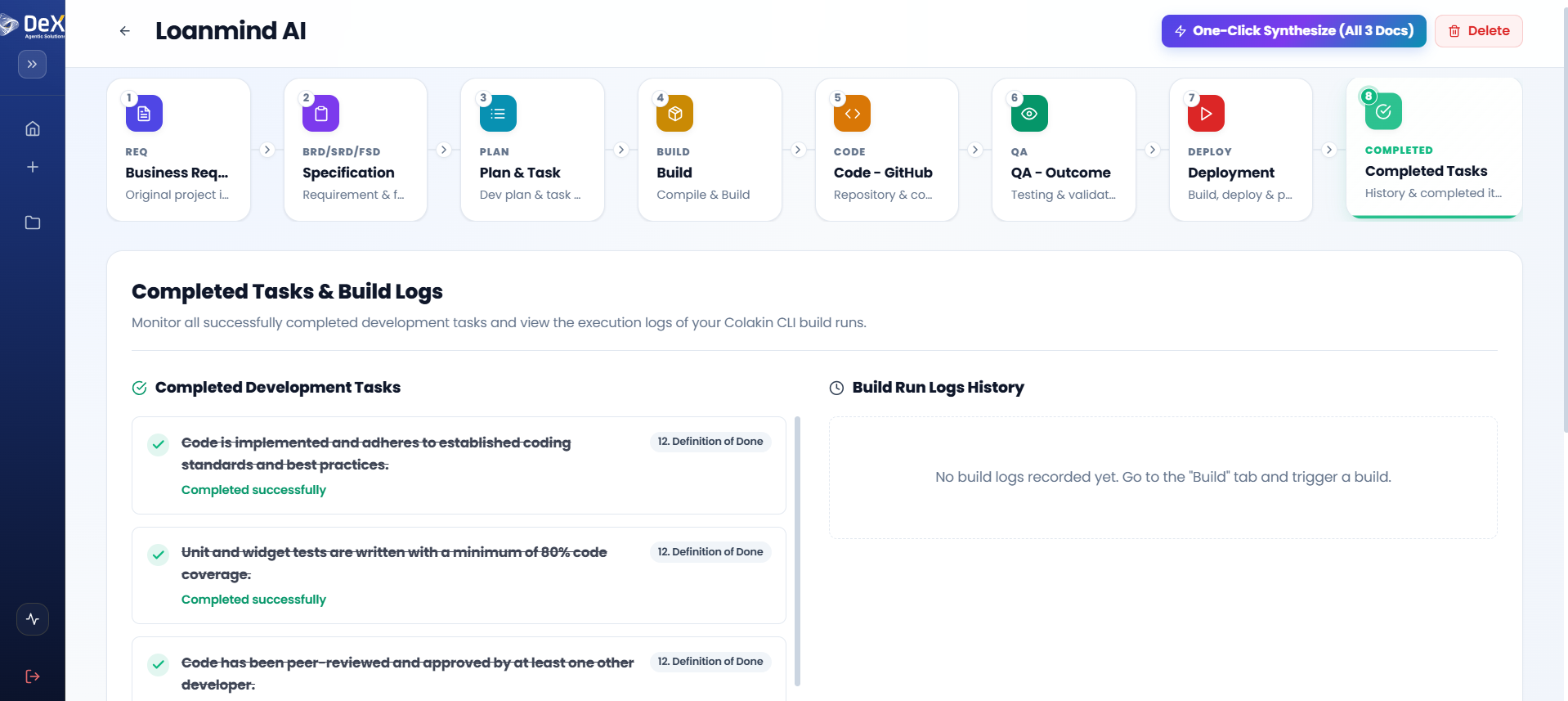
⏱️ At a Glance The final stage. Once a project is deployed, this becomes its permanent audit trail — every completed item, mapped to your Definition of Done, plus the full build log history.
Purpose: Provide a consolidated, auditable record of all completed development activities, build logs, and delivery milestones. This stage serves as the official archive for the project.
📍 Pipeline position: Stage 9 of 9 (final) — see the full pipeline map.
Steps
- After successful deployment, navigate to Stage 9 – Completed Tasks.
- Review the Completed Items List — each item is mapped to your Definition of Done criteria.
- Verify the completion status marked against each item for transparency.
- Access the Execution Logs section to review detailed build history.
- If no logs are recorded, return to Stage 5 — Build to trigger a build run first.
📋 Execution logs provide full traceability for audits, compliance reviews, and post-mortems. Archive them as part of your project documentation package.
Worked Example — Contractor Sync Completed Tasks
After deployment, the Contractor Sync Completed Tasks list showed all five sprints marked done, each item mapped to its Definition of Done — including the QA-flagged biometric storage fix as a distinct, separately logged completed item. The execution logs were archived alongside the BRD, SRD, and FSD as the project's permanent audit record.
Where to Go Next
- Start a new project: Projects
- Revisit the full pipeline from the start: Active Projects — Overview
- Review the original ask that started it all: Stage 1 — Business Request