Build enterprise-grade API security with Keycloak, Kong Gateway, and OAuth 2.0. Learn how to centralize identity management, enforce sophisticated security policies, and scale modern distributed API ecosystems without compromising on developer productivity.
Modern enterprises face a critical challenge: protecting APIs while maintaining developer productivity and operational efficiency. Fragmented security approaches—where each application implements its own authentication—create security vulnerabilities, compliance risks, and operational complexity.
By combining Keycloak (identity management), Kong Gateway (API orchestration), and OAuth 2.0/OpenID Connect standards, organizations establish a unified security layer that protects APIs while enabling innovation and reducing operational overhead. This architectural pattern has become the standard for enterprises managing distributed API ecosystems.
Fragmented API security creates measurable costs. Organizations with distributed authentication systems spend 40-60% of security team time on credential management, experience 20-30% developer productivity loss due to authentication complexity, and face elevated breach risks from multiple credential stores. Average security breaches cost $4.29M per incident, while GDPR compliance violations can result in fines up to 4% of annual revenue.
A unified security architecture delivers concrete returns: centralized credential management reduces breach surface area by 80%, policy updates accelerate from weeks to minutes, identity management overhead decreases by 60-70%, and developers gain standardized OAuth 2.0/OIDC across all APIs. Time to API integration reduces from 4 weeks to 1 week, enabling faster partner ecosystem enablement and business agility.
Identity Layer (Keycloak) handles user authentication, credential management, and multi-factor authentication. Keycloak centralizes user provisioning, manages role hierarchies, and supports multiple authentication methods including passwordless login and SAML federation.
Authorization Layer (OAuth 2.0/OIDC) provides standards-based token generation and validation. This protocol prevents applications from handling user passwords directly, uses bearer tokens for stateless validation, and implements scopes to enforce least-privilege access. Tokens expire automatically, enforcing periodic re-authentication.
Gateway Layer (Kong) enforces security policies through API routing, token validation, rate limiting, and load balancing. Kong acts as a single point of policy enforcement, transforming requests, managing upstreams, and preventing unauthorized access before it reaches backend services.

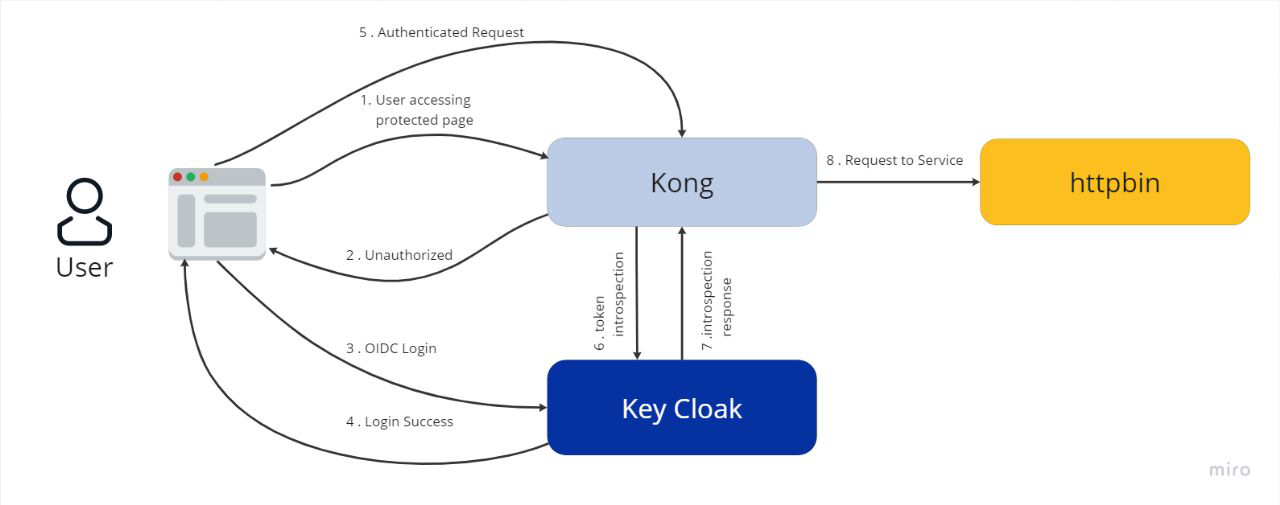
The system consists of four main components running in containers. Keycloak runs on port 8180 as the identity provider, Kong Gateway operates on port 1337 to route and secure API traffic, the frontend application runs on port 3000, and backend services are deployed on ports 3311, 3312, and 3313 with load balancing for high availability.

Start by accessing the Keycloak admin console at http://localhost:8180 with default credentials
(username: admin, password: admin). Create a new realm called "Experimental" by clicking "Add Realm" in the left
sidebar. This realm will contain all users, clients, and security policies for your application.

Next, add a client application by navigating to Clients and creating a new entry named "myapp" with protocol
type "openid-connect" and access type "confidential". Set the Valid Redirect URI to
http://localhost:3000/*. Under the Credentials tab, generate a client secret—save this value as
Kong will need it later. Configure role mapping by clicking the Mappers tab and creating a new mapper with name
"roles", type "User Realm Role", and token claim name "roles".

Add users through the Users menu, entering username, email, and setting email verification to enabled. Assign roles via the Role Mapping tab, then set a temporary password in the Credentials tab.

Access Kong's admin console at http://localhost:1337. Create an upstream service named "demo" to
represent your load-balanced backend cluster. Set the hash strategy to "cookie" and the hash cookie name to
"user_type" to maintain session persistence—requests from the same user go to the same backend server.

Add backend targets for each server instance (ports 3311, 3312, 3313). Kong will automatically distribute requests across these servers while maintaining session affinity.

Create a service pointing to the "demo" upstream. Next, enable OIDC authentication by running this curl command, replacing the client secret with your actual value from Keycloak:
curl --location 'http://localhost:8001/plugins' \
  --header 'Content-Type: application/x-www-form-urlencoded' \
  --data-urlencode 'name=oidc' \
  --data-urlencode 'config.client_id=myapp' \
  --data-urlencode 'config.client_secret=YOUR_SECRET' \
  --data-urlencode 'config.bearer_only=yes' \
  --data-urlencode 'config.realm=experimental' \
  --data-urlencode 'config.introspection_endpoint=http://keycloak:8180/realms/experimental/protocol/openid-connect/token/introspect' \
  --data-urlencode 'config.discovery=http://keycloak:8180/auth/realms/experimental/.well-known/openid-configuration'
Enable CORS (Cross-Origin Resource Sharing) to allow browser-based applications to call your APIs. In Kong's Plugins section, add a global CORS plugin with allowed methods "GET, POST, OPTIONS" and allowed headers "Content-Type, Authorization".
Build and deploy your frontend application using Docker with docker build -t frontend . and
docker run -p 3000:3000 frontend. Update the .env file with your Keycloak
configuration including realm name, client ID, Keycloak SSO URL, and Kong gateway address.
Deploy backend services by building your Docker image and running three instances on different ports (3311, 3312, 3313). Configure database connectivity using environment variables for database host, name, username, and password.
The authentication flow works as follows: users navigate to the frontend and click login, which redirects to Keycloak. After entering credentials, Keycloak issues an access token stored locally by the frontend. When the frontend calls APIs through Kong, it includes this token in the Authorization header. Kong validates the token against Keycloak and routes valid requests to a backend server.
Test API endpoints using curl with your access token. Verify that authentication fails without a valid token, load balancing distributes requests across backend servers, and token expiration enforces re-authentication.
Before deploying to production, change all default credentials, enable TLS/SSL encryption for all communication, implement network segmentation, restrict Keycloak admin access to internal networks, and enable comprehensive audit logging. Implement multi-factor authentication and establish strong password policies.
Monitor key metrics including authentication latency (target <50ms), token validation cache hit rates (target >95%), system uptime (target 99.95%+), and security incidents (target zero breaches). These metrics indicate whether your security infrastructure meets business and operational requirements.
Unified API security architecture using Keycloak, Kong, and OAuth 2.0 transforms how enterprises protect APIs. By centralizing identity management, standardizing on industry protocols, and implementing sophisticated policy enforcement, organizations reduce security risk, improve operational efficiency, and accelerate time-to-market.
The result is a flexible, scalable platform that supports business growth while maintaining security compliance and developer productivity. This approach has become the foundation for enterprises managing sophisticated API ecosystems. Ready to implement unified API security? Start by assessing your current authentication landscape, identifying security gaps, and planning a phased deployment. Contact the Colakin Engineering team to discuss how this architecture can accelerate your digital transformation.